DanceHit: AI Dance Generator
- 4.6
- Rating
- 100.00K
- Installs
- Free
- Price

 Analysis by App-foxy
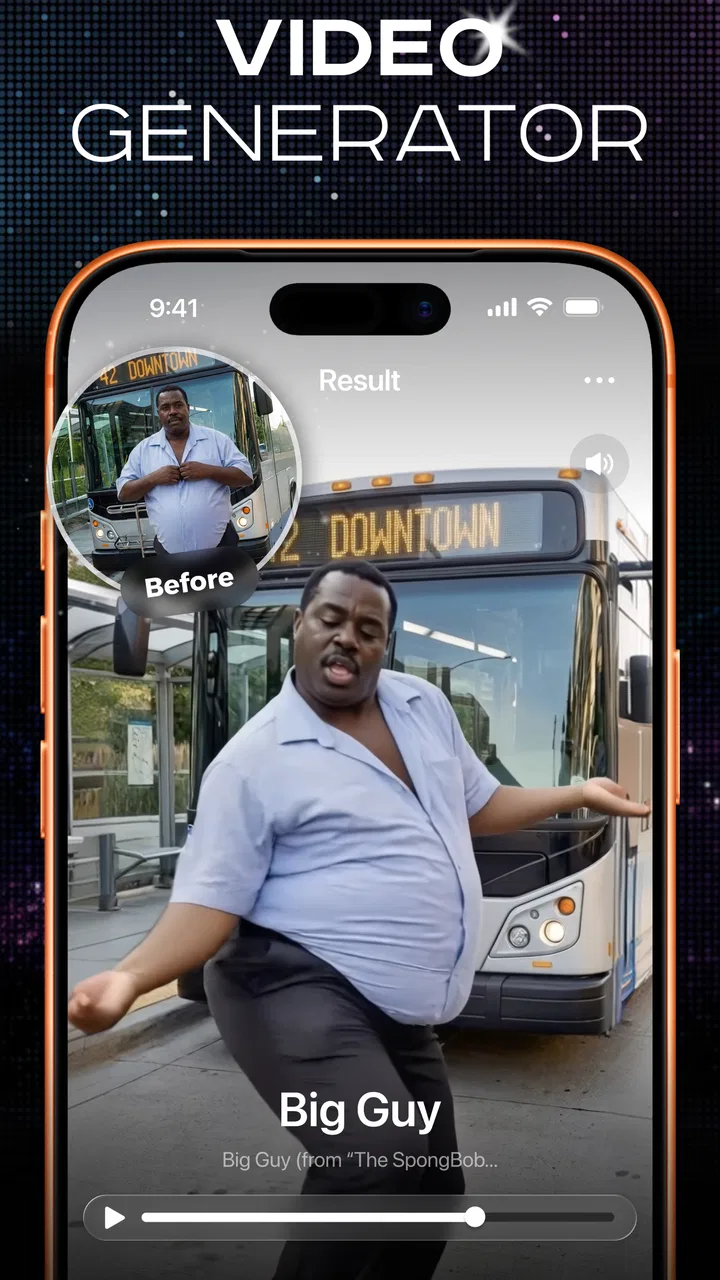
I tried DanceHit: AI Dance Generator as a quick way to turn ordinary photos into playful dance clips, and my first impression was clear: this is aimed at instant social content rather than careful video production. The app comes from ScaleUp, sits in the Photography category, and is free to start. Its central idea is simple enough for anyone to understand: choose a photo of a person, pet, or baby, apply a dance concept, and create a short result that feels ready to share.
That simplicity is the main attraction. I did not need to learn a timeline, keyframes, masking, or a complicated editing interface before making something entertaining. The app is built around the fun of seeing a still image become animated, so it works best when I treat the result as a lighthearted social post rather than a polished music video. The Everyone age rating also fits that approachable positioning.
At the time of my review, the app showed an average rating of 4.6 from around 4.7 thousand ratings, with over 10 thousand installs. Those figures suggest that the concept has found an audience, although they should not be confused with the depth of a mature video-editing platform. I would describe it as a focused creative toy with a practical publishing use, not a replacement for a full editor.
You May Also Like

 AccuWeather: Weather Radar
AccuWeather Review: A Quick, Clear Forecast for Everyday Decisions
For everyday plans, the best forecast is the one you can understand quickly. AccuWeather makes rain timing, radar, and local conditions easy to act on, with a few trade-offs.

 Hill Climb Racing
Why Hill Climb Racing Still Turns Crashes Into One More Run
A tiny car, a bumpy hill and one more upgrade: Hill Climb Racing keeps resurfacing because its simple chaos makes every near-miss feel personal.

 AliExpress - Shopping App
AliExpress Makes Global Shopping Feel Personal, but Shoppers Bear the Risk
AliExpress turns a global marketplace into a pocket-sized discovery engine. Its reach is useful, its shopping loop compelling, and its trade-offs easy to miss.

 Lords Mobile: Kingdom Wars
Lords Mobile Is a Kingdom-Building Routine, Not a Quick Match
A case-by-case verdict on the building, battles, device demands, and social commitments that make Lords Mobile rewarding for some players and exhausting for others.

 PDF Scanner app - TapScanner
TapScanner Makes Paperwork Easier to Capture, Check, and Share
TapScanner makes scanning with a phone feel less like a rescue operation and more like a dependable step in getting work done. Its capture tools are useful, though not flawless.

 Block Blast!
 Shows How Much a Puzzle Game Can Leave Out
A quiet grid game shows why puzzle players increasingly value instant clarity, repeatable skill and low-pressure play—and where the genre still needs to catch up.
More From Our News Desk
View All News


From one photo to a usable creative idea
The best way to begin is with a photo that has one obvious subject. I found that a clear image with the face and body visible gives the app a stronger starting point than a crowded group picture. A pet sitting or standing in a recognizable pose can be more effective than a blurry action shot, while a baby photo benefits from a simple background and a subject that is not partly hidden by blankets, toys, or furniture.
This is an important distinction from ordinary filters. A color filter can rescue a poorly composed image, but a dance generator needs enough visual information to interpret the subject. I would therefore choose the source image before thinking about the dance style. If the original photo is confusing, the animation may feel strange even when the idea itself is amusing.
For an everyday example, imagine preparing a birthday post for a family group. Instead of searching through a large video library, I could select one cheerful portrait, create a dancing version, and use it as a short surprise message. The same workflow works for a pet account, a casual joke between friends, or a quick reaction post when a normal photograph feels too static.
The creative starting point is deliberately narrow, and that is both a strength and a limitation. I would not open this app expecting a blank canvas where I can invent an entire visual identity. I would open it when I already have a photo and want a fast transformation with a clear entertainment angle. If my starting point is a product image, a landscape, or a carefully staged portrait for a professional campaign, a conventional editor will give me more control.
One useful habit is to prepare several candidate photos before committing to a result. The most attractive picture is not always the one that animates best. A full-body image may communicate movement more clearly than a close-up, while a centered subject can be easier to read than someone placed at the edge of the frame. This small selection step saves time because it prevents me from blaming the dance effect for a weak source image.
Choosing the right subject and mood
The app’s appeal changes depending on the subject. With people, it can turn a familiar portrait into a playful greeting or social post. With pets, the novelty is immediate because the contrast between a still animal photograph and a dance performance creates the joke. Baby photos can produce a similarly shareable effect, but I would use those results thoughtfully and only share them with people who are comfortable with that kind of content.
I also think the intended audience matters before creating anything. A silly dancing pet may work perfectly in a private family chat but feel out of place on a professional profile. The same generated clip can be charming, awkward, or distracting depending on where it is published. DanceHit helps with the transformation, but it does not decide whether the result matches the tone of the account.
That is one of the less obvious creative decisions: the photo should match the destination, not just the effect. For a public social post, I would use an image with a clean background and a subject that can be recognized quickly on a small phone screen. For a private joke, I can tolerate a more imperfect source because the context does more of the work.
How the making process feels in practice
The making process is more approachable than the workflow in a traditional mobile video editor. Instead of building a sequence from multiple clips, I begin with a single image and let the app handle the transformation. That makes the first attempt quick, especially for someone who has never edited video before or who does not want to spend several minutes arranging layers.
I would still approach each generation as a draft. An AI-based transformation can capture the general idea without producing a perfectly natural performance every time. Small visual oddities are easier to forgive in a humorous post than in a serious creative project. The app is strongest when the audience is meant to react with surprise and amusement, not inspect every frame.
My advice is to keep the first attempt simple. Start with a well-lit, uncluttered photo and a recognizable dance concept. Once the basic result works, experiment with a different subject or image. Changing too many variables at once makes it difficult to understand whether the photo, the selected style, or the subject caused an unsatisfying result.
Another practical point is to think vertically if the intended destination is a short-form social feed. Even when the source photograph is horizontal, a mobile audience usually sees the final post in a narrow portrait-oriented space. A subject placed too far from the center may lose impact after the result is viewed in a small preview. I would crop or choose the source with that viewing context in mind before starting.
The app’s focused workflow is useful for non-editors, but it also creates friction for experienced creators. I cannot treat it like a full production suite where I can precisely direct timing, movement, transitions, text placement, or sound design. If I need exact control over a brand video, a tutorial, or a multi-scene story, I would make the visual transformation here only if it genuinely adds value, then move to a separate editor for the rest.
What to do when the first result is not convincing
When a result feels off, I would not immediately repeat the same process with the same image. First, I would inspect the source for distractions: hands hidden behind objects, faces turned sharply away, cropped legs, reflective surfaces, or several people competing for attention. Replacing the image often improves the outcome more than repeatedly pressing generate.
I would also compare the result at normal phone size rather than zooming in. A minor visual irregularity that looks noticeable in a close inspection may disappear when the clip is viewed in a busy social feed. On the other hand, if the subject becomes hard to recognize even in a small preview, the concept has probably missed its purpose.
This gives DanceHit a particular kind of learning curve. The buttons may be easier than those in a professional editor, but good results still depend on visual judgment. The app removes much of the technical work; it does not remove the need to choose a suitable source or understand the audience.
Iteration: turning a novelty into a better post
The first generated clip is often the moment that explains the app, but iteration is what determines whether I would actually publish it. I prefer to make a small set of variations using different source photos rather than endlessly modifying one weak image. That approach keeps the process playful and gives me a clearer comparison between options.
A useful workflow is to create one version for humor and another for clarity. The humorous version might use an expressive pet photo or an intentionally unexpected pose. The clearer version might use a centered portrait with fewer background distractions. If the first one gets a stronger reaction from friends but the second looks cleaner, I can choose based on the purpose of the post rather than assuming the most technically tidy result is always best.
I would also keep the final clip short in spirit, even if the app’s output allows a longer viewing experience. Social audiences often decide quickly whether to continue watching. The transformation itself is the hook, so adding unnecessary context can weaken the joke. If I need an introduction, caption, or closing message, I would add it later in another editor instead of expecting the generator to serve as a complete publishing workstation.
One non-obvious trade-off is consistency. A generated dance clip can be excellent as a one-off, but a creator who wants a repeatable visual series may find it harder to maintain a precise style from post to post. The app is designed around individual transformations, so I would test several examples before promising a regular branded format. For a personal account, variation is part of the fun. For a business account, variation can make the feed feel less controlled.
There is also a social judgment involved with using photographs of other people. I would ask permission before transforming a friend’s image for a public post, especially when the result changes how the person appears. The same care applies to children and pets when their images are being shared beyond a private circle. The app makes creation easy, but responsible publishing still depends on the person using it.
Where it fits beside ordinary photo and video editors
Compared with a standard photo editor, DanceHit offers a more dramatic payoff. A crop, sticker, or color adjustment can improve an image, but they do not create the same sense of movement from a still photograph. Compared with a conventional video editor, however, it is much less flexible. A timeline editor is better for combining several shots, controlling exact cuts, adding captions, balancing audio, or building a story with a beginning and end.
That comparison helps define the right user. I would recommend this app to someone who wants a fast, surprising result without learning production software. I would not recommend relying on it alone for a client presentation, a structured campaign, or a project where every movement must match a specific brief. In those situations, the usual alternatives provide more control and a clearer revision path.
There is a middle ground for creators who already use editing software. They can treat the generated dance as one creative ingredient, then finish the post elsewhere. For example, I might use the transformation as the visual centerpiece, add a title card in a video editor, trim the opening, and prepare a version suited to a particular social platform. That makes the app valuable without asking it to do a job it was not built to handle.
Export, sharing, and the handoff to publishing
The final stage should be planned before I create the clip. A funny result can lose impact if the file is difficult to locate, if the framing does not suit the destination, or if I need to make several edits that the app does not provide. I would decide whether the result is for a private message, a social post, or a later project, then judge it in that context.
For casual sharing, the app’s focused concept is convenient because the creative decision happens quickly: choose a photo, create the dance, and move toward publication. For more deliberate publishing, I would consider a handoff to another editor. That is where I can add a caption, adjust the opening moment, combine the clip with other material, or prepare multiple versions for different audiences.
I would also review the finished result before posting rather than sharing it immediately. Check that the intended person or pet remains recognizable, that the movement does not distract from the joke, and that no private detail in the background has become unexpectedly prominent. This review takes only a moment and is especially worthwhile when the original image came from a family album or a personal setting.
The free entry point makes experimentation easy, but the app also includes in-app purchases priced from $11.99 to $39.99 per item. I would therefore try the basic workflow first and decide whether the results justify spending money for my particular use. Someone who only wants an occasional amusing clip may be satisfied without paying, while a frequent creator should consider the cost in relation to how often the generated content will actually be published.
That pricing structure is an important part of the handoff decision. I would not pay simply because the first transformation is entertaining. I would pay only if the app consistently saves me time, produces clips I can genuinely use, or supports a recurring creative routine. If I still need extensive correction after every attempt, a conventional editor or another specialized tool may offer better value for my needs.
Who should use it, and who should skip it
I see DanceHit working especially well for casual creators, families, pet owners, and social users who want to turn a single photograph into a conversation starter. It is also a reasonable first step for someone intimidated by editing software. The clear concept means I can focus on choosing a good image and deciding where the result belongs instead of learning a complicated production system.
I would be more cautious about recommending it to photographers who want to preserve a realistic portrait, marketers who need predictable brand output, or video editors who expect detailed control. The playful transformation can conflict with a serious visual identity, and an AI-generated movement may not meet the precision required for professional delivery. For those users, the app is better viewed as an idea generator than as the main production tool.
Device compatibility is another practical consideration: the app requires at least iOS or Android version 12. On a supported device, I would still leave enough free space and use a stable connection when creating or handling media, because photo-to-video workflows can be more demanding than ordinary image filters. I would also keep the app updated; the current version is 1.0.7, so the product is still at an early stage where the experience may continue to evolve.
That early-stage feel is not automatically negative. It means the focused experience can feel fresh and uncomplicated, but it also makes me less likely to choose it for a long-term professional pipeline without testing it carefully. I would begin with a low-stakes personal project, evaluate the result from start to finish, and only then decide whether it deserves a regular place in my creative routine.
My overall verdict is positive, with a clear boundary. DanceHit is most enjoyable when I use it as a fast idea-to-post tool, not as a complete video studio. It turns the familiar act of selecting a photo into something more expressive and shareable, and it lowers the barrier for people who want movement without editing lessons. The strongest results come from thoughtful source selection, a suitable audience, and a willingness to treat the first output as a draft.
I would recommend trying it if you want an amusing dancing portrait, a pet clip, or a quick social surprise and you are comfortable with a certain amount of AI-generated unpredictability. I would skip it if your project depends on exact choreography, detailed timelines, or consistent commercial branding. For my own workflow, its best role is at the creative starting point: it supplies a distinctive visual moment, while a separate editor handles the careful finishing and delivery.
In that role, DanceHit: AI Dance Generator is easy to understand and genuinely fun to test. Its free starting point encourages experimentation, its Photography category placement reflects the way it begins with still images, and ScaleUp has kept the main idea focused. I would use it when the goal is a quick reaction, a playful message, or a surprising social post—and I would choose a more traditional tool whenever control matters more than novelty.
FAQs for DanceHit: AI Dance Generator
01What is DanceHit: AI Dance Generator and how does it work?
DanceHit: AI Dance Generator is an entertainment app that uses artificial intelligence to create dance-style videos from photos or other user-provided content. After selecting an image, template, or dance effect, the app processes the material and applies animated movements, choreography, and visual effects. Results can vary depending on image quality, pose, lighting, and the selected template.
02Is DanceHit: AI Dance Generator free to download and use?
The app may be free to download, but some of its most attractive features can require in-app purchases, credits, or a premium subscription. Before creating several videos, check the pricing screen carefully, including trial terms, renewal dates, and available packages. Users should also confirm whether exports, high-resolution results, or popular templates are restricted to paid members.
03What kind of photos work best with DanceHit: AI Dance Generator?
For more convincing results, use a clear, well-lit photo with the person facing the camera and the full body or the requested body area visible. Avoid images with heavy blur, extreme poses, crowded backgrounds, sunglasses, or multiple people unless the selected template specifically supports them. A simple background and recognizable facial features usually help the AI produce a cleaner animation.
04Can videos created with DanceHit be saved and shared on social media?
DanceHit is designed for creating short, shareable dance videos, and finished results may be saved to a device or shared through supported social platforms. Export options can depend on the app version, subscription level, template, and whether a watermark is included. Review the preview and export settings before publishing, especially if you want a specific resolution or format.
05Is DanceHit: AI Dance Generator safe for privacy and personal photos?
Because the app processes uploaded images, users should review its privacy policy and permissions before using personal or sensitive photos. Check whether images are uploaded to remote servers, how long generated content is retained, and whether data may be used to improve AI features. Avoid uploading private documents, intimate images, or pictures of other people without their permission.
Pros
- Turns photos into entertaining AI dance videos quickly.
- Offers a variety of dance styles and animated templates.
- Simple interface suitable for casual users.
- Easy to save and share generated clips on social platforms.
- Creates fun results without requiring video editing skills.
Cons
- Some features may require a subscription or in-app purchases.
- AI results can vary depending on the uploaded photo.
- Processing may take longer on older or less powerful devices.
- Generated videos may include branding or export limitations.
- Uploading personal photos raises privacy considerations.

DanceHit: AI Dance Generator
Gallery